

One-Click GPU Environments: VS Code, Jupyter, and More
One-Click GPU Environments: VS Code, Jupyter, and More
We just shipped something that should have existed from day one: one-click development environments for GPU pods.
The Problem
Here's what GPU development usually looks like:
- Spin up a GPU instance
- Wait for it to boot
- SSH in
- Install your tools (code-server, Jupyter, whatever)
- Configure systemd services so they survive reboots
- Figure out how to expose ports
- Finally start working
That's 20-30 minutes of setup before you write a single line of code. Every. Single. Time.
The Fix
Now when you launch a GPU on packet.ai, you can select an auto-setup option:
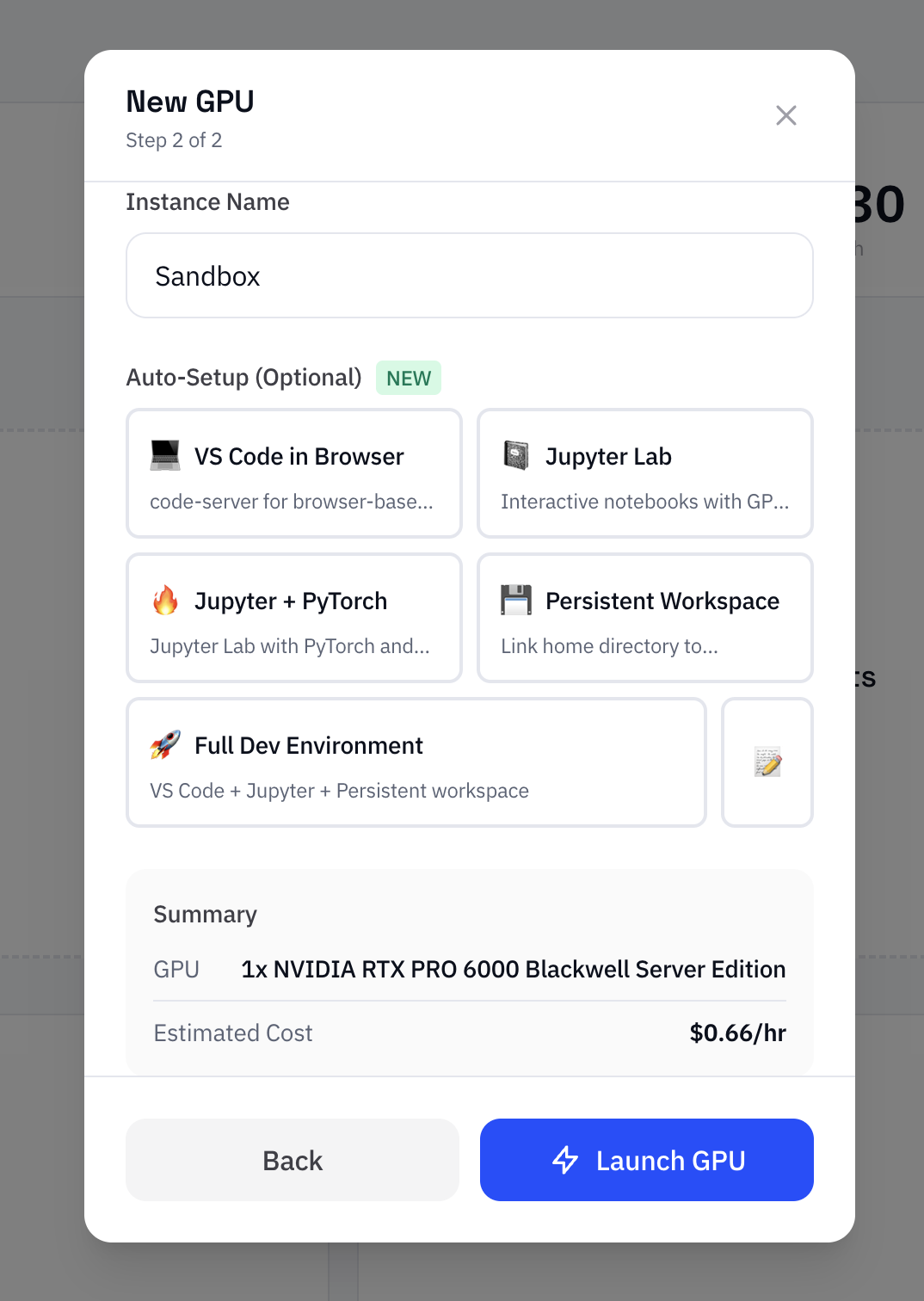
- VS Code in Browser — Full VS Code via code-server, accessible from any browser
- Jupyter Lab — Interactive notebooks with GPU support, pre-loaded with numpy, pandas, matplotlib
- Jupyter + PyTorch — Jupyter with PyTorch and CUDA already configured
- Persistent Workspace — Your home directory survives pod restarts
- Full Dev Environment — VS Code + Jupyter + persistence, all in one
Select one, launch your GPU, and everything is ready when the pod boots. The services run via systemd, so they're persistent across reboots.
Automatic Port Exposure
Here's the part that really matters: we automatically expose the ports for you.
When your startup script finishes, we detect which services were installed and expose them through our proxy. No manual port configuration, no fumbling with NodePort settings. Your VS Code or Jupyter URL appears in the dashboard as soon as the setup completes.
How It Works
- Select your environment in the launch modal (step 2)
- Launch the GPU as normal
- Wait ~2-5 minutes for the startup script to complete
- Click the proxy URL that appears in your dashboard
That's it. Your development environment is ready.
Custom Scripts
Don't see what you need? You can also write custom startup scripts. The script runs as root after the pod boots, so you can install anything—CUDA libraries, ML frameworks, custom tools.
For custom scripts, you'll still need to expose ports manually through the dashboard. But for the presets, it's fully automatic.
Why This Matters
GPU time is expensive. Setup time is wasted time.
If you're paying $0.66-$2.25/hour for a GPU, spending 30 minutes on setup means you've burned $0.33-$1.12 before doing any actual work. Multiply that across your team and it adds up fast.
More importantly, friction kills momentum. When spinning up a dev environment takes 30 minutes, you think twice before doing it. You start batching work, compromising workflows, or just avoiding GPU development altogether.
One-click environments remove that friction. Need to test something on a GPU? Launch, wait two minutes, start coding.
Try It
Next time you launch a GPU:
- Go to your dashboard
- Click "Launch GPU"
- In step 2, select "VS Code in Browser" or "Full Dev Environment"
- Launch and wait for the proxy URL to appear
Your GPU development workflow just got a lot simpler.